
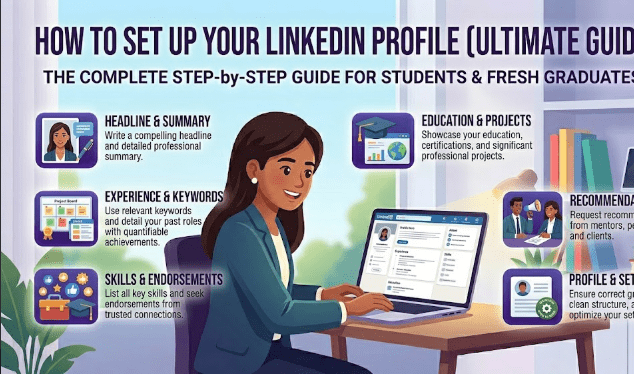
How to Create a Perfect LinkedIn Profile as a Student in 2026: The Complete Step-by-Step Guide
Most students set up a LinkedIn account, fill in their name and university, upload whatever photo they have on their phone, and then wonder why nothing happens. No connection requests from recruiters. No job opportunities appearing in their inbox. No interview calls from companies they admire. The profile sits there collecting digital dust while employers scroll right past it without a second glance. If this sounds familiar, you are not alone — and the good news is that the gap between a LinkedIn profile that gets ignored and one that consistently attracts opportunities is much smaller than most students think. It comes down to understanding what LinkedIn actually is, how its algorithm works, and what hiring managers and recruiters are genuinely looking for when they search the platform for candidates.
In 2026, LinkedIn has over one billion users globally and is the single most important professional networking platform in the world. Recruiters use it every single day to actively search for candidates — including students and fresh graduates — for internships, entry-level roles, graduate programs, and freelance projects. Having a strong, complete, and strategically optimized LinkedIn profile is no longer optional for anyone who is serious about their career. It is as essential as having a well-written CV. This guide will walk you through every section of LinkedIn with specific, practical advice on what to write, what to avoid, and how to make your profile work actively for your career even while you are still studying.
Table of Contents
- 1. What Is LinkedIn and Why Does It Matter for Students
- 2. Why Your LinkedIn Profile Matters More Than Ever in 2026
- 3. Step-by-Step Guide to Building Your Perfect LinkedIn Profile
- 4. How to Grow Your LinkedIn Network as a Student
- 5. How to Use LinkedIn to Find Jobs and Internships
- 6. Common LinkedIn Profile Mistakes Students Make
- 7. Expert Tips to Stand Out on LinkedIn in 2026
- 8. LinkedIn Profile Optimization Checklist
- 9. Frequently Asked Questions
- 10. Conclusion
- 11. Sources and References
- 12. Author Bio
What Is LinkedIn and Why Does It Matter for Students

LinkedIn is a professional social networking platform where individuals build their career identity, connect with professionals in their industry, discover job and internship opportunities, share knowledge, and grow their professional reputation over time. Unlike Facebook or Instagram which are primarily personal and social in nature, LinkedIn is built specifically around professional development, career growth, and business relationships. Every interaction on LinkedIn — from the connections you make to the content you engage with — contributes to your professional reputation in a way that is visible to recruiters, hiring managers, and potential clients or collaborators.
For students specifically, LinkedIn serves several critical functions simultaneously. It is a living, dynamic version of your CV that you can update in real time as you gain new skills, complete new projects, and earn new certifications. It is a networking tool that allows you to connect directly with professionals, alumni from your university, and hiring managers at companies you are interested in — connections that would be almost impossible to make through any other channel. It is a job board where thousands of internships, graduate schemes, and entry-level positions are posted daily. And it is a content platform where you can build a professional reputation by sharing insights, writing articles, and engaging with content in your field — demonstrating your knowledge and enthusiasm in a way that a static CV simply cannot.
Why Your LinkedIn Profile Matters More Than Ever in 2026
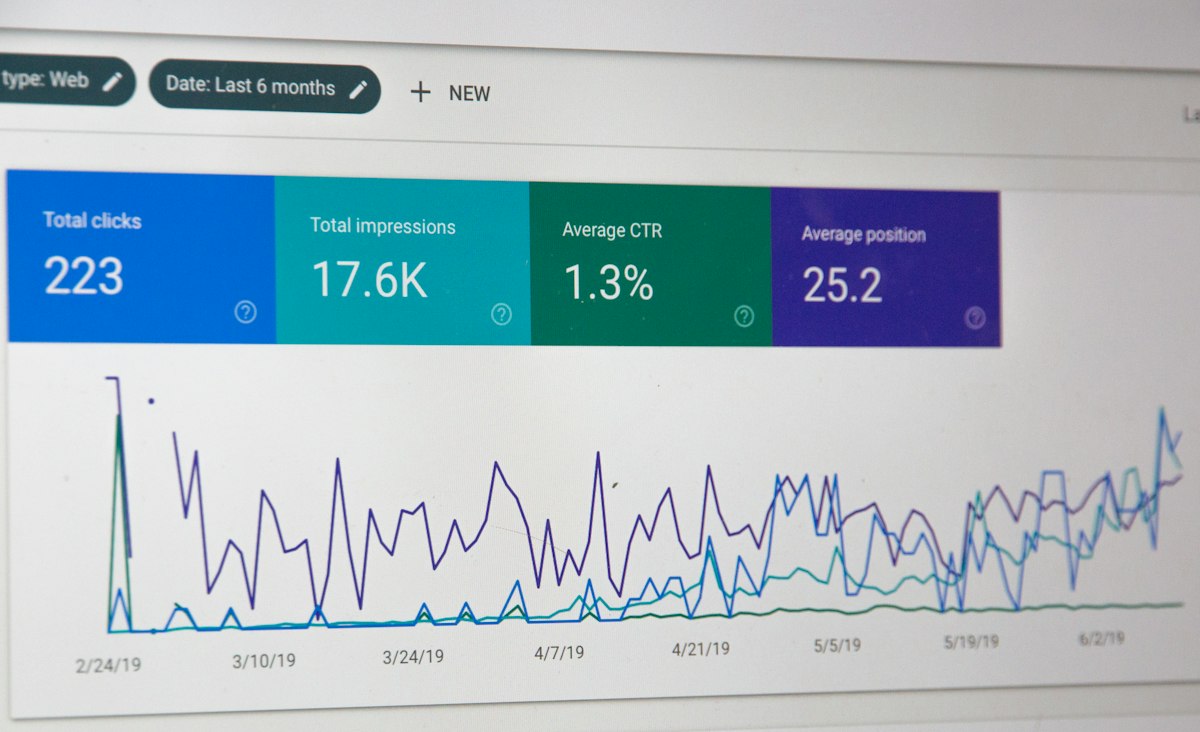
The professional landscape in 2026 has shifted in ways that make a strong LinkedIn presence more important than at any previous point in the platform’s history. Remote work has made physical networking events less central to career development, which means that online professional networking on platforms like LinkedIn has filled that gap and become even more essential. The rise of remote and hybrid work also means that companies are now comfortable hiring talent from anywhere — which means a student in Karachi can genuinely connect with and be noticed by a hiring manager in London or Dubai, purely through the quality of their LinkedIn profile and the professional credibility they build on the platform.
From the recruiter’s perspective, LinkedIn has become the primary tool for proactive talent sourcing — meaning recruiters do not just wait for applications to arrive. They actively search LinkedIn using specific keywords, skills, education backgrounds, and locations to find candidates who match their requirements. This is fundamentally different from a job board where you apply and wait. On LinkedIn, being discoverable means that opportunities can come to you, even when you are not actively searching. Students who understand this dynamic and optimize their profiles for recruiter searches gain a significant passive advantage in the job market that compounds over time as their profiles become more complete and their networks grow.
Step-by-Step Guide to Building Your Perfect LinkedIn Profile
Step 1: Choose a Professional Profile Photo That Creates the Right First Impression

Your profile photo is the first thing anyone sees when they come across your profile, and research consistently shows that LinkedIn profiles with professional photos receive significantly more profile views and connection requests than those without. You do not need to hire a professional photographer — a high-quality photo taken on a modern smartphone in good lighting is perfectly sufficient. The key requirements for a strong LinkedIn profile photo are straightforward: the photo should show your face clearly and take up approximately 60 percent of the frame, the background should be clean and simple without distracting elements, your clothing should be appropriate for a professional context in your industry, your expression should be friendly and approachable with a natural smile, and the lighting should be bright and even rather than harsh or shadowy. A casual selfie, a photo cropped from a group picture, a blurry image, or a photo with a messy background all signal a lack of professionalism and will actively hurt your profile’s performance. Natural lighting near a window, a plain wall as background, and smart professional clothing will produce a photo that serves your LinkedIn profile excellently without any expensive photography equipment.
Step 2: Write a LinkedIn Headline That Goes Beyond Your Job Title
Your LinkedIn headline is the line of text that appears directly below your name on your profile and in every search result, connection request, and comment you make across the platform. It is one of the most important pieces of text on your entire profile because it is what determines whether someone clicking on your profile in a search result or seeing your name in a mutual connection’s notifications decides to look at your profile further. Most students write something generic here like “Student at University of Karachi” or “Final Year Business Student” — which communicates almost nothing useful and gives no reason for a recruiter or professional to click through to the full profile.
A strong LinkedIn headline for a student communicates three things: what you can do or what value you offer, your current status, and what you are working toward. For example, rather than “Final Year Marketing Student,” consider something like “Marketing Student | Content Strategy and Social Media Growth | Open to Internships and Graduate Roles.” Instead of “Computer Science Student,” try “Computer Science Student | Python Developer | Building Web Applications | Seeking Software Engineering Internship 2026.” These headlines contain the keywords recruiters search for, communicate your specific skills, and clearly signal your availability and goals. LinkedIn allows 220 characters in the headline — use them strategically rather than leaving most of that space unused.
Step 3: Write an About Section That Tells Your Professional Story
The About section of your LinkedIn profile is your opportunity to speak directly to anyone who visits your profile in a more personal, narrative way than any other section allows. It appears near the top of your profile and is one of the most searched and read sections by recruiters and hiring managers. Despite its importance, it is one of the most frequently underused sections on student profiles — left entirely blank or filled with a few generic sentences that communicate nothing memorable. LinkedIn allows up to 2,600 characters in the About section, which gives you considerable space to tell your professional story compellingly.
A strong About section for a student profile should open with a hook that immediately establishes who you are and what drives you professionally, describe your current academic background and the specific areas within your field that you are most passionate about, highlight two or three of your most relevant skills or experiences with brief specific examples, mention any notable achievements, projects, certifications, or extracurricular activities that demonstrate your capabilities, clearly state what kind of opportunities you are currently seeking, and invite people to connect with you for relevant opportunities or conversations. Write in first person and keep the tone professional but genuinely human — it should feel like a real person speaking, not a formal document. Avoid the temptation to list buzzwords without context — phrases like “passionate,” “motivated,” and “team player” are meaningless without specific evidence to back them up.
Step 4: Complete Your Education Section With Strategic Detail
For students, the Education section of LinkedIn is particularly important because it is often the primary credential on your profile. Complete it thoroughly rather than leaving it as a bare minimum entry. Include your degree name and field of study exactly as it appears on your official university documents, your university name, your start and expected graduation dates, your GPA or academic percentage if it is strong, relevant coursework that is directly applicable to your career goals, any academic achievements, dean’s list mentions, or scholarships, and extracurricular activities or societies you were involved in through your university. The Activities and Societies field within the education section is particularly valuable because it gives you space to mention leadership roles, clubs, sports teams, and volunteer activities that demonstrate qualities beyond academic performance.
Step 5: Build Your Experience Section Using Projects and Non-Traditional Work

Many students avoid completing the Experience section of LinkedIn because they feel they have no work experience to list. This is a misunderstanding of what “experience” means in a professional context. Experience on LinkedIn encompasses far more than formal paid employment — it includes internships, volunteer roles, freelance work, research projects, entrepreneurial initiatives, student society leadership positions, and significant personal or academic projects. Any substantial activity through which you developed and demonstrated relevant professional skills qualifies as experience worth documenting on LinkedIn. For each experience entry, write two to four bullet points that describe not just what you did but what you achieved — using the same STAR approach recommended for CVs and cover letters, with specific results and numbers wherever possible.
Step 6: Add Skills Strategically and Seek Endorsements
LinkedIn allows you to add up to 50 skills to your profile, and these skills are directly searchable by recruiters who use LinkedIn’s talent search tools. Research the specific skills that are most commonly required in job postings for roles you are targeting, and make sure those skills appear on your profile. Prioritize your top three skills by moving them to the top of your skills section — these are the most prominently displayed and most frequently endorsed. Once you have added your skills, reach out to professors, classmates, and professional contacts who can genuinely vouch for those skills and ask them to endorse you. Skill endorsements from credible connections add significant social proof to your profile and improve your visibility in recruiter searches.
Step 7: Add Licenses and Certifications to Demonstrate Continuous Learning
The Licenses and Certifications section of LinkedIn is one of the most effective ways for students to demonstrate initiative, continuous learning, and specific technical expertise beyond their formal degree. Every certification you have earned — whether from Google, HubSpot, Microsoft, Coursera, edX, or any other recognized platform — should be listed here with the certification name, issuing organization, issue date, and credential ID or verification URL if available. This section signals to recruiters that you invest in your own professional development, that you are staying current with industry tools and practices, and that you have specific verified skills that go beyond what your degree coursework covers. Given that many of the most valued certifications in 2026 are available for free, there is no reason not to have at least three to five relevant certifications listed here before you start applying for jobs.
Step 8: Request Recommendations From People Who Know Your Work
LinkedIn recommendations are written testimonials from people who have worked with you or observed your work in a professional or academic context — professors, project supervisors, internship managers, volunteer coordinators, or fellow students who collaborated closely with you on significant projects. A recommendation on LinkedIn is essentially a public reference letter, and even one or two strong recommendations from credible individuals can meaningfully differentiate your profile from those of other candidates with similar qualifications. When requesting a recommendation, personalize your request rather than using LinkedIn’s generic template — remind the person of specific projects or contributions they witnessed, explain the type of role or opportunity you are pursuing, and suggest the particular qualities or skills you would most appreciate them speaking to if they are comfortable doing so.
Step 9: Customize Your LinkedIn URL
By default, LinkedIn assigns you a URL that contains a random string of numbers — something like linkedin.com/in/yourname-3b47k91. This looks unprofessional when included on your CV, email signature, or cover letter. LinkedIn allows you to customize this URL for free to something clean and professional like linkedin.com/in/yourfullname or linkedin.com/in/firstname-lastname. To do this, go to your profile page, click “Edit public profile and URL” in the upper right corner, and edit the URL in the right panel. A customized LinkedIn URL is a small detail that signals professionalism and makes your profile much easier for people to find and remember.
How to Grow Your LinkedIn Network as a Student

A LinkedIn profile without a meaningful network is like a shop with no customers — it exists but it is not working for you. Building your LinkedIn network strategically as a student requires a thoughtful approach rather than simply sending connection requests to as many people as possible. Start with the people you already know — classmates, professors, university alumni, family friends who are professionals, and anyone you have met through internships, volunteer work, or extracurricular activities. These warm connections are the foundation of your network and the people most likely to accept your request, engage with your content, and refer you to opportunities when they arise.
Beyond your existing contacts, LinkedIn’s alumni tool is one of the most underused but most powerful networking features available to students. By searching for alumni from your university who work in your target industry or at companies you are interested in, you can identify people who share your educational background and who are therefore much more likely to respond positively to a connection request and a genuine message asking for career advice or insight into their industry. When you reach out to someone you do not know personally on LinkedIn, always include a personalized connection message rather than using the generic request. Briefly explain who you are, why you are reaching out specifically to them, and what you are hoping to discuss or learn from the connection. People who receive dozens of generic connection requests ignore most of them — but a thoughtful, specific message explaining why you genuinely want to connect with that particular person is far more likely to result in a meaningful response.
How to Use LinkedIn to Find Jobs and Internships
LinkedIn’s Jobs section is one of the most powerful job discovery tools available to students, but most users only use it at its most basic level — searching for jobs and clicking apply. Used strategically, LinkedIn’s job search tools can significantly improve both the quality of opportunities you discover and your chances of being noticed as a candidate. Start by using the Jobs tab to search for internships, graduate roles, or entry-level positions in your field and location. Use the filter tools to narrow results by job type, experience level, date posted, and company size. Set up job alerts for your most important searches so that you receive notifications when new matching positions are posted — speed of application matters on LinkedIn where popular roles can receive hundreds of applications within hours of posting.
Beyond basic job searching, use LinkedIn to research companies you are interested in before applying — follow their company pages, read their posts, and look at the profiles of employees in roles similar to the ones you are targeting. This research will make your applications significantly more specific and compelling. Use LinkedIn’s Easy Apply feature for initial applications where available, but always follow up with a personalized message to the hiring manager or recruiter if you can identify them. And importantly, signal your job-seeking status on LinkedIn using the Open to Work feature, which adds a frame to your profile photo and makes your profile appear in recruiter searches for available candidates in your location and field.
Common LinkedIn Profile Mistakes Students Make
| Mistake | Why It Hurts You | The Fix |
|---|---|---|
| No profile photo or unprofessional photo | Profiles without photos receive 21x fewer views | Take a clean professional headshot with good lighting |
| Generic headline showing only university name | Misses keywords recruiters search for | Include skills, status, and career goals in headline |
| Empty or very short About section | Missed opportunity to tell your story | Write 200 to 300 words telling your professional story |
| No certifications or skills listed | Profile appears incomplete and unambitious | Add all relevant certifications and top skills |
| Connecting randomly without personalized message | Low acceptance rate, no meaningful relationship built | Always send a personalized note with connection requests |
| Never posting or engaging with content | Profile gets no algorithm visibility | Post or engage with relevant content at least weekly |
| Default LinkedIn URL with random numbers | Looks unprofessional on CV and email | Customize URL to linkedin.com/in/yourname |
| Ignoring the recommendations section | No social proof of your abilities | Request 2 to 3 recommendations from professors or supervisors |
Expert Tips to Make Your LinkedIn Profile Stand Out in 2026

- Add a LinkedIn cover photo that reinforces your professional brand: The banner image at the top of your profile is an underused piece of visual real estate that most students leave as the default blue background. Adding a relevant, professional banner image — showing a university campus, a clean workspace, or something related to your field of study — immediately makes your profile look more complete and intentional. Free tools like Canva have LinkedIn banner templates that you can customize in minutes.
- Use the Featured section to showcase your best work: The Featured section allows you to pin specific posts, articles, links, or media files to the top of your profile where visitors will see them prominently. Use this section to feature your portfolio website, a particularly strong project, a published article, a significant academic achievement, or a certification that you want to highlight. This section transforms your profile from a static list of credentials into a dynamic showcase of your actual work.
- Post content consistently to build visibility: LinkedIn’s algorithm rewards consistent activity. Students who regularly share relevant insights, comment thoughtfully on industry posts, share articles with their own perspective added, or write short posts about their learning journey receive significantly more profile views and connection requests than those who only update their profile information without engaging with the platform’s content features. You do not need to post every day — even two or three posts per week is sufficient to build meaningful platform visibility over time.
- Join and participate in LinkedIn Groups: LinkedIn Groups organized around specific industries, career fields, universities, or professional interests are excellent places to connect with like-minded professionals, discover job opportunities that are shared within the group, and contribute to discussions that build your visible reputation in your field. Search for groups relevant to your degree subject and career interests, join the most active ones, and participate meaningfully in discussions rather than just consuming content passively.
- Turn on Creator Mode if you plan to post content regularly: LinkedIn’s Creator Mode changes your profile to prioritize your content output, adds a Follow button in addition to the Connect button, and gives you access to additional creator tools including LinkedIn Live and Newsletter features. If you plan to share content regularly, switching to Creator Mode increases your content’s reach and makes it easier for people outside your immediate network to discover and follow your profile.
LinkedIn Profile Optimization Checklist
| Profile Element | Requirement | Status |
|---|---|---|
| Profile Photo | Professional, clear, good lighting, appropriate clothing | ☐ Complete |
| Cover Banner Image | Professional and relevant to your field | ☐ Complete |
| Headline | Includes skills, status, and career goal keywords | ☐ Complete |
| Custom LinkedIn URL | linkedin.com/in/yourname format | ☐ Complete |
| About Section | 200 to 300 words, professional story, call to action | ☐ Complete |
| Education Section | Complete with coursework, achievements, activities | ☐ Complete |
| Experience / Projects | At least 2 to 3 entries with bullet points and results | ☐ Complete |
| Skills Section | At least 10 relevant skills added and endorsed | ☐ Complete |
| Certifications | All relevant certifications listed with verification links | ☐ Complete |
| Recommendations | At least 2 recommendations received | ☐ Complete |
| Featured Section | Portfolio, project, or achievement highlighted | ☐ Complete |
| Open to Work | Status set with relevant job titles and locations | ☐ Complete |
| Network Size | At least 100 meaningful connections | ☐ Complete |
| Content Activity | Posting or engaging at least weekly | ☐ Complete |
Frequently Asked Questions About LinkedIn for Students
Should I create a LinkedIn profile while still in my first year of university?
Absolutely yes — and the earlier the better. Creating your LinkedIn profile in your first or second year gives you the maximum amount of time to build your network, accumulate connections, add certifications, and develop your professional online presence before you start seriously applying for internships or graduate jobs. Students who start their LinkedIn profiles in their final year are at a significant disadvantage compared to those who have been building theirs throughout their degree. The time you invest in building LinkedIn early compounds significantly — a network of 300 genuine connections built over three years is vastly more valuable than 50 connections built in three months before graduation.
Is it appropriate to connect with people I do not know on LinkedIn?
Yes — connecting with people outside your immediate circle is one of the primary purposes of LinkedIn and is completely normal professional behavior on the platform. The key is to always send a personalized connection message that briefly explains who you are and why you want to connect. Generic connection requests to strangers have a low acceptance rate and do not build meaningful relationships. A thoughtful, specific message — especially when connecting with alumni from your university or professionals in your target field — is almost always appreciated and often leads to genuinely useful conversations and introductions.
How often should I update my LinkedIn profile?
Your LinkedIn profile should be treated as a living document that you update whenever significant changes occur in your professional or academic life — completing a new certification, finishing a significant project, taking on a new leadership role, changing your career goals, or gaining new skills. Beyond these event-triggered updates, do a thorough review of your entire profile at least once every three to four months to ensure everything is current, accurate, and still presenting you in the best possible light relative to the opportunities you are currently pursuing.
Can a LinkedIn profile help me get a job without applying anywhere?
Yes, genuinely. A well-optimized LinkedIn profile can attract inbound opportunities — meaning recruiters or professionals reach out to you rather than you applying to them. This is one of the most powerful aspects of LinkedIn when used well. Recruiters with LinkedIn Recruiter licenses actively search for candidates using keyword filters, and profiles that are complete, keyword-rich, and show clear professional intent appear prominently in those searches. Many students and professionals receive interview invitations and job offers from roles they never actively applied for, purely because their LinkedIn profile made them discoverable and compelling to the right people at the right time.
What should I post on LinkedIn as a student with limited professional experience?
You have more to post about than you might think. You can share insights from interesting lectures or books you have read in your field. You can post about projects you are working on and what you are learning from them. You can share industry news with your own perspective and analysis added. You can write about your experience at a volunteer event, university competition, or networking event. You can celebrate completing a certification or reaching a learning milestone. The key is to make sure everything you post on LinkedIn is professional, adds some form of value or insight to your network, and reflects the professional reputation you are working to build in your chosen field.
Conclusion: Your LinkedIn Profile Is Your 24/7 Career Ambassador

Your LinkedIn profile works for you around the clock in a way that no other career tool can match. While your CV sits in an email attachment waiting to be opened, your LinkedIn profile is actively searchable by thousands of recruiters and professionals at every hour of every day. When it is complete, strategic, and genuinely compelling, it functions as a 24/7 career ambassador — presenting your professional story, demonstrating your skills and ambitions, and making you discoverable to the people and opportunities that can accelerate your career.
The students who build strong LinkedIn profiles early — who invest time in completing every section thoughtfully, who grow their networks consistently, who engage with their professional community regularly, and who use the platform actively rather than passively — enjoy a genuine and compounding career advantage over those who create an account and never optimize it properly. Every hour you invest in building your LinkedIn presence as a student pays dividends long after graduation.
Start today with the checklist in this guide. Complete one section at a time. Do not wait until you feel your profile is impressive enough — it becomes impressive through the process of building it. Make your first meaningful connection this week. Post your first professional update. Take one step at a time, and trust that the cumulative effect of those steps will produce results that genuinely surprise you.
Recommended Articles on Edu2Work
- How to Write a CV With No Work Experience — Complete guide for students and fresh graduates
- How to Write a Cover Letter That Gets You Hired — Step-by-step with real examples
- Job Interview Preparation Guide for Fresh Graduates — Ace your first interview
- Best Free Online Courses With Certificates in 2026 — Boost your LinkedIn credentials for free
- Best High Income Skills for Students in 2026 — Skills worth adding to your LinkedIn profile
Sources and References
- LinkedIn Official Help Center — linkedin.com/help/linkedin — Official guidance on profile optimization features
- LinkedIn Talent Solutions Blog — business.linkedin.com/talent-solutions/blog — Recruiter insights and hiring trends
- LinkedIn Learning — linkedin.com/learning — Free certifications and professional development resources
- National Careers Service (UK) — nationalcareers.service.gov.uk — Professional career guidance and resources
- Google Career Certificates — grow.google/certificates — Free certifications to add to LinkedIn profile
About the Author
 |
Nadeem Bugti is the admin of this website and is responsible for managing content quality and publishing. For inquiries, you can contact him via email at nadeembugti190@gmail.com or WhatsApp at +92 333 0737987. |


